


First Impression of AIHomeworkHelper.com
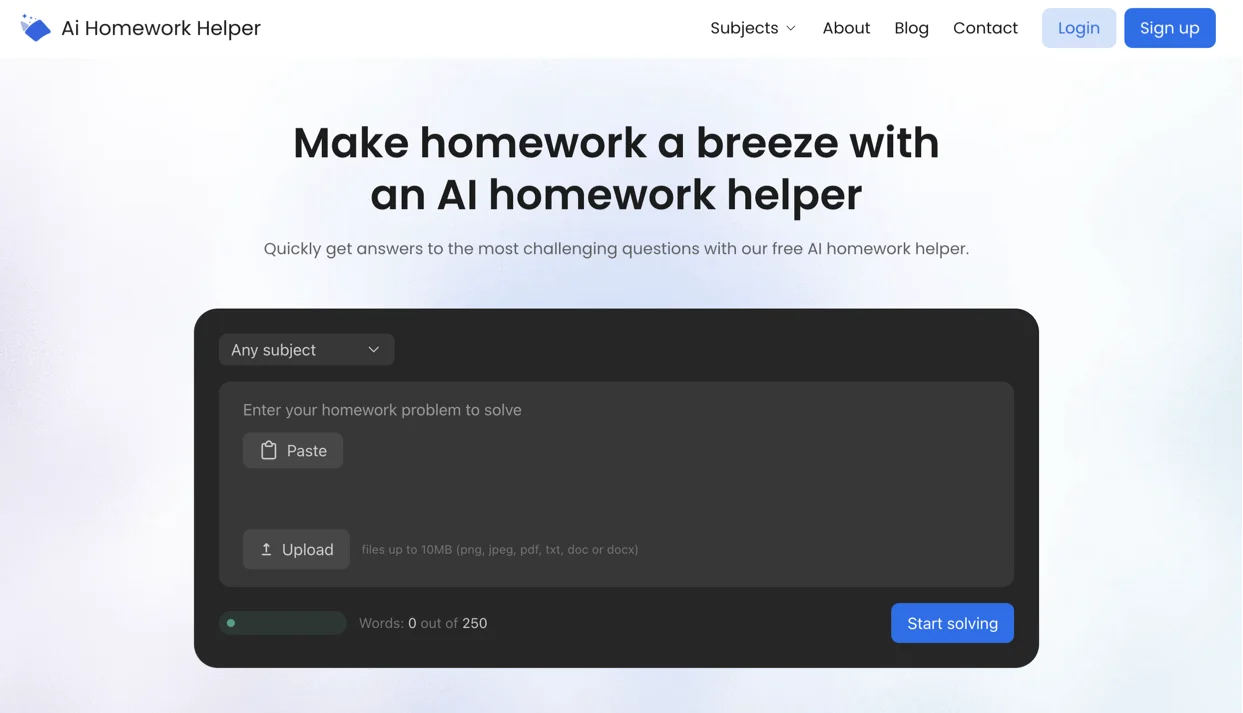
AIHomeworkHelper is a simple browser tool built for one job: turning a homework prompt into an answer you’re looking for. You can paste your question, or upload a photo or PDF.
The site leans hard on step-by-step breakdowns, so it feels more like a checker and explainer than a generic chatbot response. That matters when you’re trying to understand why the answer works, not just copy it.
What we like right away is the low friction. It’s positioned as an AI homework helper free online tool, with no sign-up required to start. If you do want to save past prompts and responses, an account is optional.
The tool also highlights OCR for images and PDFs, which is the difference between “ugh, retyping” and “done in 10 seconds.”
Subject-wise, it’s geared toward common student pain points like math and science, plus a handful of other core classes, so it covers the stuff you’re most likely to want to double-check.
Verdict on AIHomeworkHelper: A Trustworthy Pick for Studying
AIHomeworkHelper does what most students want from this kind of tool: it gives you an answer and shows the path it took to get there.
You can scan the logic, spot where your own work went sideways, and rerun a question with one tweak when something looks off. It’s also fast, and the photo/PDF upload flow removes the biggest friction point: retyping messy worksheets or math symbols.
The best way to use it is as a checker, a study buddy, and an explainer. For example, say you’re doing algebra, and you get a different result than the answer key. Upload a photo of your problem and add one line: “Show every step and point out where a common mistake happens.”
If your error is something classic, like distributing a negative sign incorrectly or combining unlike terms, the explanation makes that obvious. Then you can paste your own work and ask, “Which line is incorrect?” That’s a much more trustworthy workflow than asking for a final answer and hoping it matches.


How We Tested It for Reliability: OCR, Accuracy, and Clear Steps
This is our first time doing a full review of a homework-focused solver like AIHomeworkHelper, so we needed a simple but efficient approach we could repeat. That’s the mindset behind our AIHomeworkHelper reviews: check whether the tool stays consistent when the input changes, and whether the explanation makes the answer easy to verify.
We started by running the same questions in two formats: pasted text and an uploaded image or PDF. OCR is where tools like this either earn trust fast or lose it, so we watched for tiny misreads, minus signs, exponents, fractions, and cluttered worksheet formatting.
Next, we tested explanation quality by changing the prompt without changing the problem. We asked for “show every step,” then “explain it at a middle school level,” then “check my work and tell me the first line that’s wrong.” A solid tool should keep the math and logic stable while adjusting how it teaches.
We also included common student trap zones (sign mistakes, unit conversions, and formula swaps) to see whether the tool explains errors in a way you can learn from instead of just dropping a final answer and moving on.
AIHomeworkHelper.com Workflow Experience
The workflow is straightforward. You do one of three things: paste your question, upload a photo, or drop in a PDF. Then you hit the solve button and get a response that’s structured around steps.
This flow earns its keep with messy inputs: a worksheet photo with cramped text, a screenshot of a math problem, a scanned PDF from a teacher’s portal, or anything you’d normally dread retyping. OCR handles the reading, and you get the solution in a format you can verify.
If you want better results, spend some time coming up with your prompt. Here are a few lines to start with:
- “Show every step and label what you’re doing.”
- “Explain it like I’m in 9th grade.”
- “Check my work. Here are my steps. Tell me the first wrong line.”
- “Give the final answer and briefly explain why it’s correct.”
Used this way, the workflow becomes a loop: upload, read the steps, sanity-check the logic, and ask one follow-up if you need clarification. That’s how you speed up with your homework without turning your brain off. The longest time we spent on an assignment this way was 15 minutes.
Subjects and Levels: Where It Stays Accurate and Most Useful
For this round of AIHomeworkHelper.com reviews, we tried to break AIHomeworkHelper in the normal student ways.
We tested five subjects: math, chemistry, physics, history, and English. For each subject, we ran 20 prompts across four difficulty bands, from basic school questions to early college-style tasks. 10 prompts were pasted as text, and the other half came from phone photos of worksheets and a couple of scanned PDF pages.
Math was the easiest win. Algebra problems came back with the steps you could follow line by line.
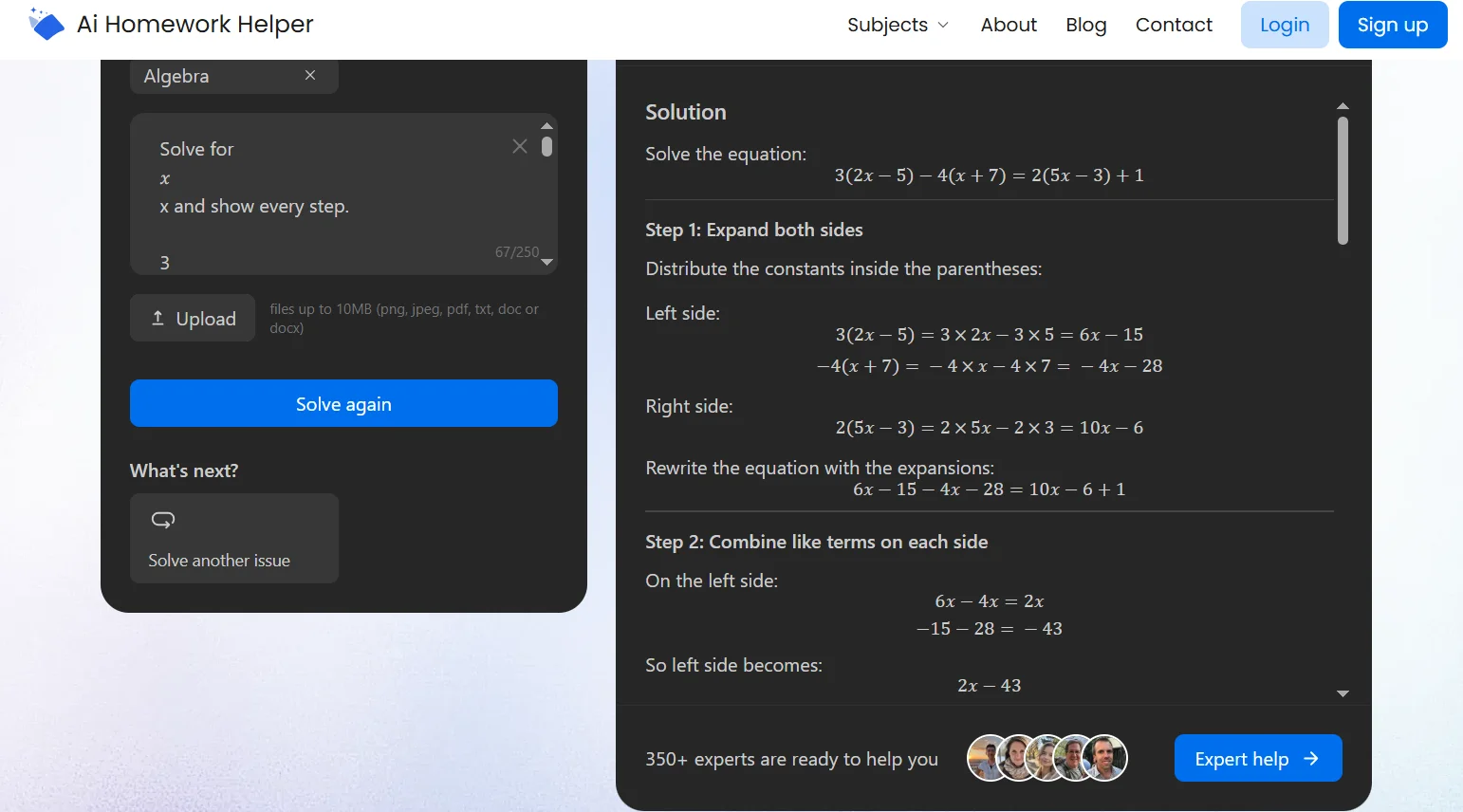
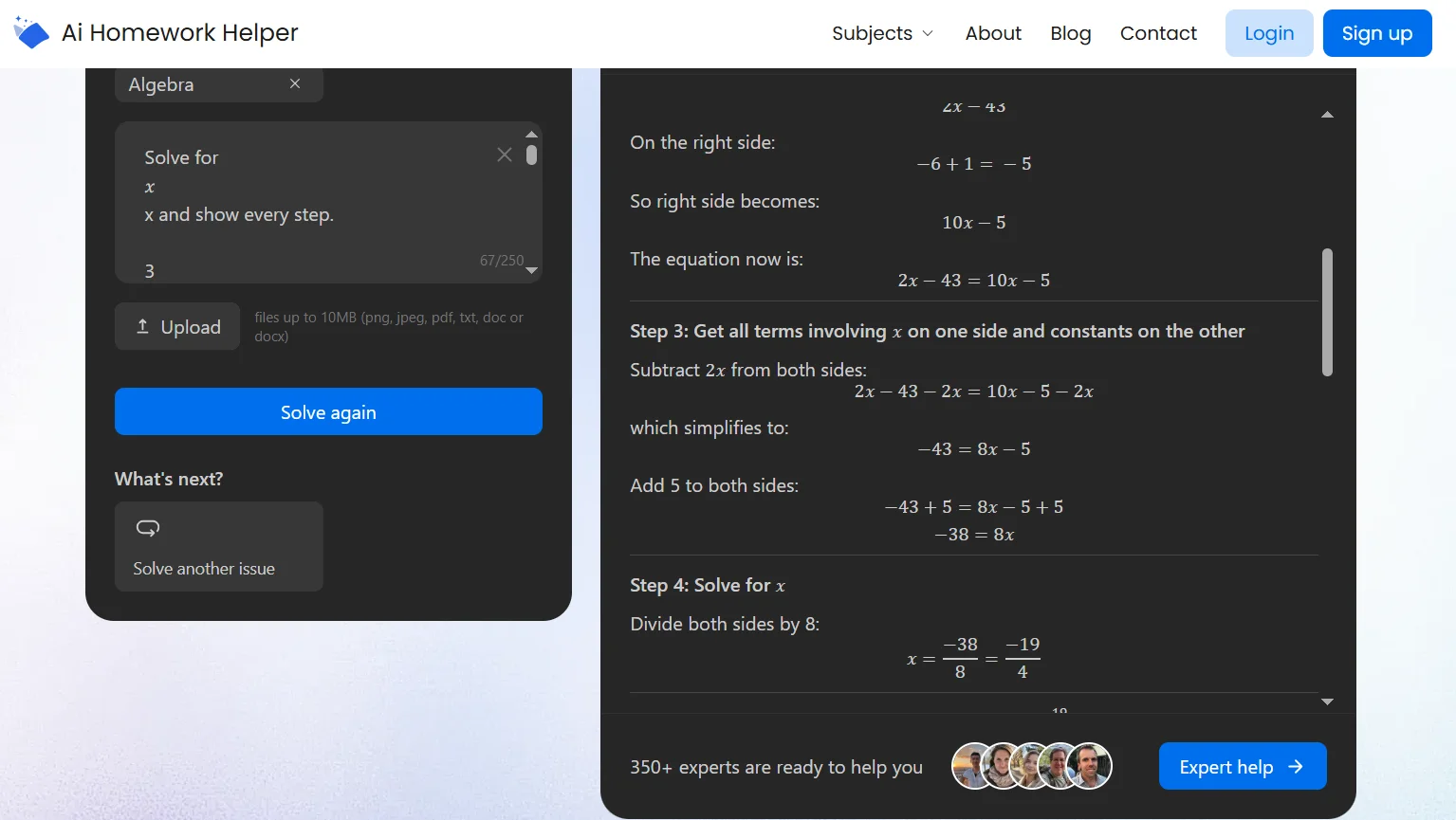
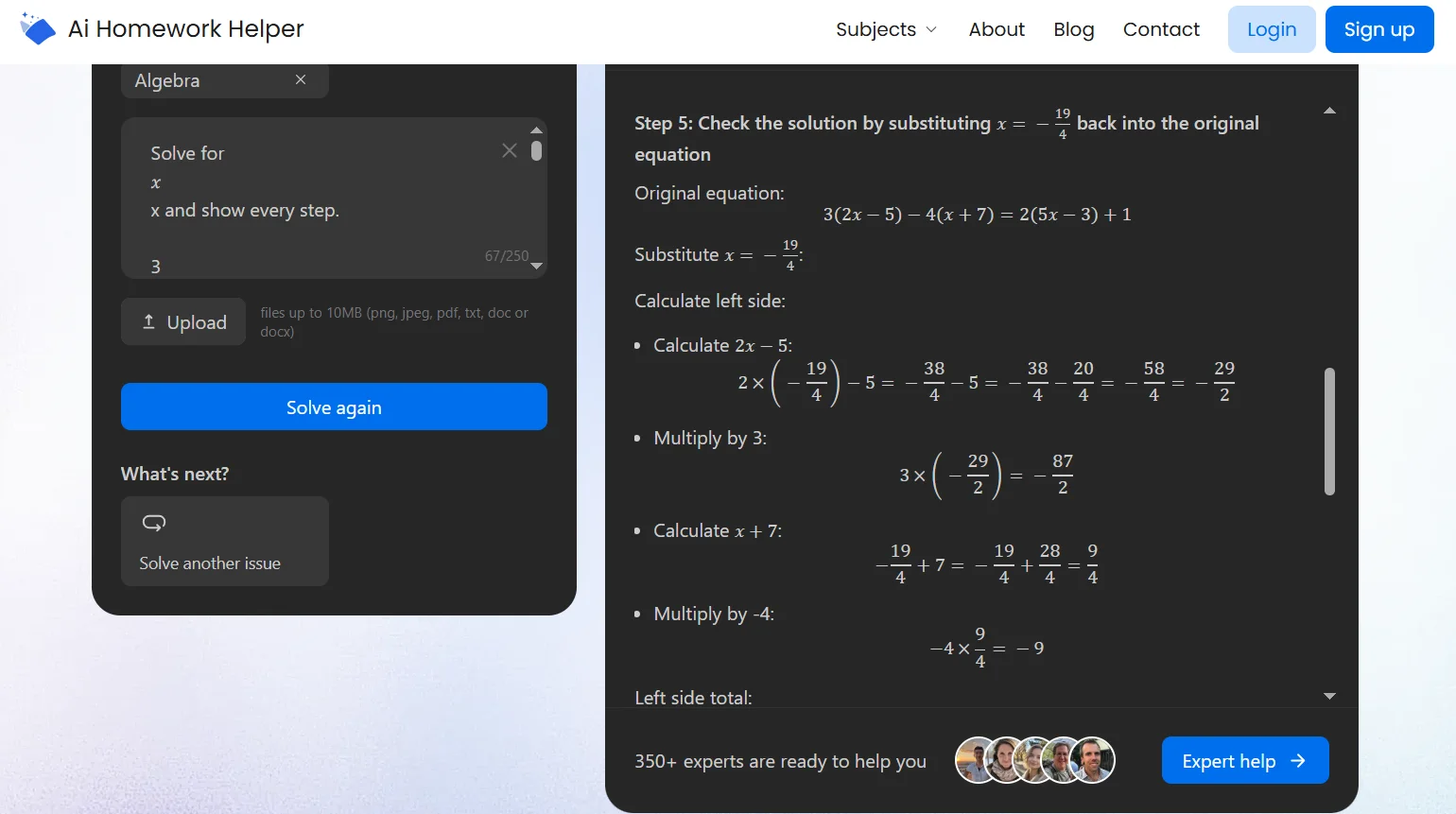
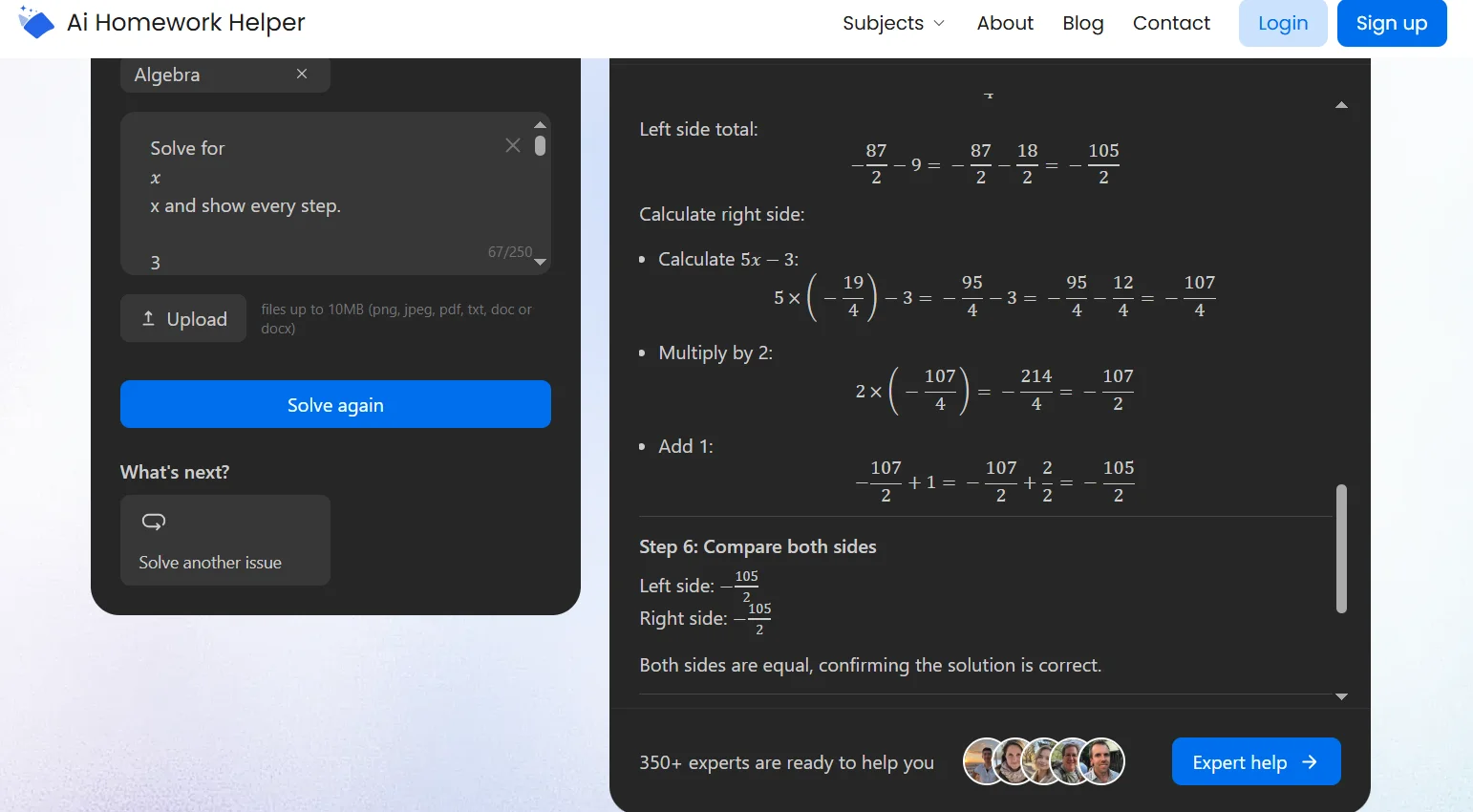
Then, at the end, the tool added a common mistake note:
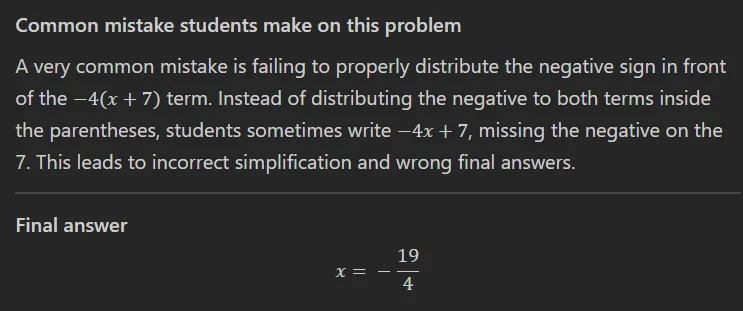
We loved that! It helps you catch the exact habit that trips students up, like dropping a minus sign or distributing incorrectly.
Chemistry and physics were strongest features when we asked it to name the formula first and then solve. History and English worked best with tight prompts, like “explain the cause in two sentences” or “fix my thesis and give one supporting point.”
One more thing we noticed: if you want a human to step in, there’s an expert help option on the platform. It can connect you with 350+ experts, but you’ll need to sign up for that feature (and this kind of service is paid, of course).
Cost and Value: What Free Means and Why It Feels Low-Risk
AIHomeworkHelper keeps the AI homework helper cost side simple. You can use the AI tool as a free option, and you can start without jumping through sign-up hoops because most people try a tool when they’re already annoyed and short on time. You want to paste a question or upload a photo, get the steps, and move on.
And honestly, the free version already covers what most students need day to day: quick answers, clear steps, and helpful notes at the end that can save you from repeating the same error next week.
If you do need a human to step in, the platform’s expert help is also pretty affordable. For example, for high school algebra with an urgent 3-hour deadline, the price is $16.20. If it’s the same kind of help but you order 5 days in advance, it drops to $10.80.
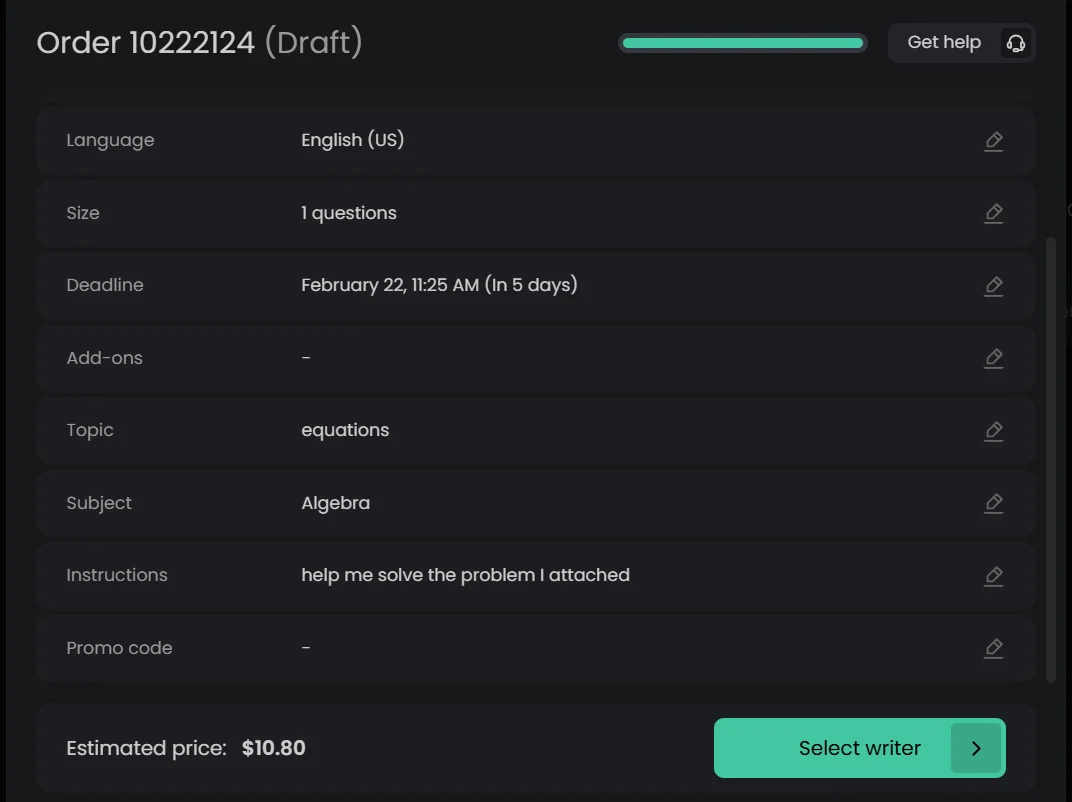
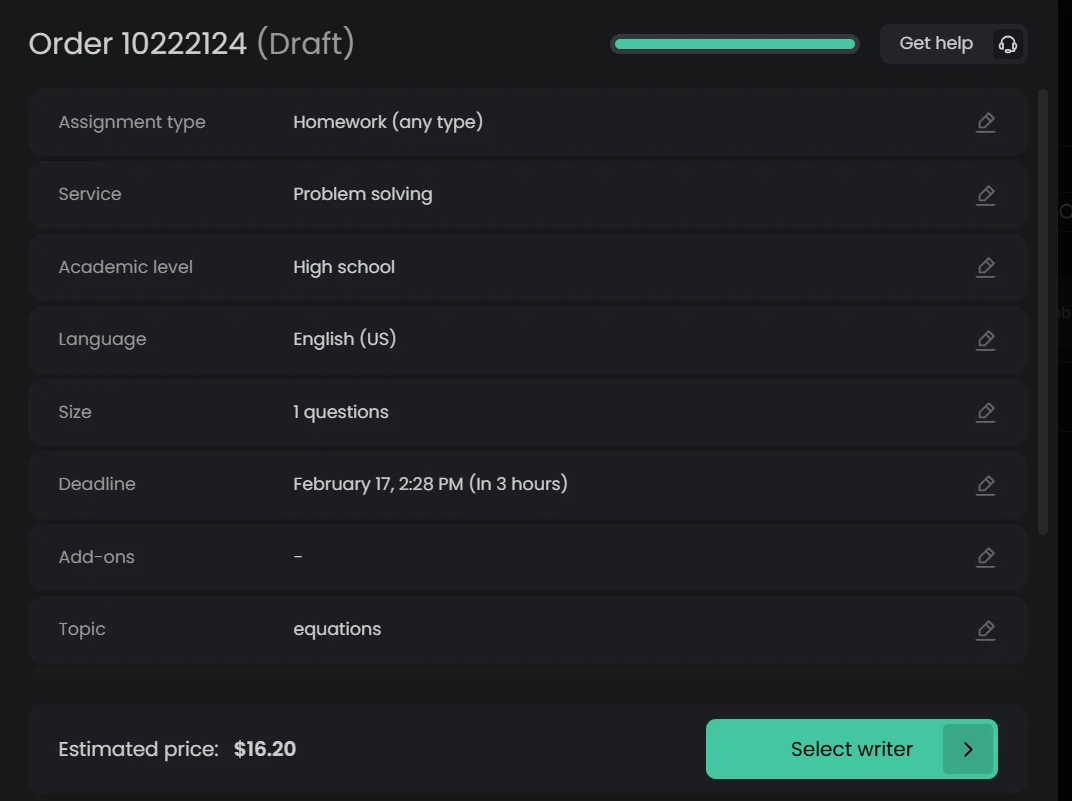
That pricing makes the paid option feel like a backup plan, which fits the way students use homework tools.
AIHomeworkHelper Under Pressure: What Happened on Messy Inputs
Once we got past the most obvious testing phase, we tried the kind of stuff that usually annoys students: a worksheet photo taken at an angle, a problem cropped by accident, and a page with a tiny font and a faint gray background that looks fine to your eyes and awful to any scanner.
This is where an AI helper for homework either earns your trust or disappoints you. In those cases, the tool didn’t magically turn chaos into perfection. But it also didn’t pretend everything was fine.
When the input was readable, it pulled the right question and moved forward. When something was missing, the output made it obvious where the gap was. That mattered because a lot of AI tools will confidently fill in blanks and you won’t notice until the final answer feels off.
One of our most telling checks was rerunning the same algebra prompt in two formats: pasted text and a phone photo of the same problem. The structure of the solution stayed steady. The wording changed a bit, but the logic tracked in the same order.
That consistency is what made the tool feel more trustworthy than a one-shot answer generator.
Student Safety and Privacy: What the Site Says
Homework tools live in a gray zone. You want urgent help, but you also don’t want your personal data floating around in a place you didn’t mean to send it.
AIHomeworkHelper does have a dedicated privacy policy, which is a good sign for a student-facing platform because it shows they’ve at least put their data handling in writing. Still, “safe” depends on what you upload.
Our rule while testing was simple: treat it like you’re showing your work to a tutor you just met. A math problem, a worksheet photo, a paragraph you wrote, sure. But we avoided anything with personal identifiers, like full names, student IDs, emails, class portals, or screenshots that include private messages.
If you’re using the expert-help option, that becomes even more important, so use a moniker when creating an account and don’t share beyond what’s necessary.
Used with that common-sense filter, AIHomeworkHelper will serve as a practical, low-risk tool for study help.
AIHomeworkHelper.com Limitations to Keep in Mind
AIHomeworkHelper is strong when the task is clear and the input is readable. When either of those slips, you might run into limits.
If a photo is heavily blurred, cropped too tight, or packed with tiny text, the tool can misread parts of the question. That’s not unique to this platform, though. It’s the trade-off of OCR. In those moments, you may need to re-upload a clearer image or paste the key line as text.
Another limitation is that some prompts are too vague. A question like “help me with this” doesn’t give enough context, especially in subjects where wording influences the outcome. The tool can still respond, but the output gets less useful until you add one detail, like the exact question or what you’ve tried.
Finally, treat it as a study and checking tool. Like any AI (or even a human, for that matter), it can’t be right 100% of the time; there’s room for error. The safer move is to use it to understand the steps and then do a quick sanity check before you turn anything in.
AIHomeworkHelper’s Pros and Cons
Our AIHomeworkHelper review comes down to one idea: the tool is at its best when you use it to learn, check, and fix your work ASAP. It keeps the process low-friction, and in our testing it stayed steady across formats and subjects.
.webp)
Frequently Asked Questions
Is AIHomeworkHelper.com legit?
Yes. From what we saw, AIHomeworkHelper behaves like a helpful student tool. The workflow is clear, it produces structured explanations, and it has basic site essentials like a published privacy policy. It also offers optional expert help through an account, which adds another layer of support behind the AI tool.
What subjects does AIHomeworkHelper cover?
In our tests, we focused on math, chemistry, physics, history, and English because they expose strengths and weak spots faster. The platform is built around common homework subjects, especially math and science, plus other core classes where students often need quick checking or clearer explanations.
How much does this AI homework helper cost?
The AI tool is free to use, so you can start without paying. If you want expert help, pricing depends on urgency. For high school algebra, we saw $16.20 for help within 3 hours, and $10.80 for the same type of help ordered 5 days in advance.
Is AIHomeworkHelper.com safe to use for students?
It is perfectly safe as it doesn’t store your data. For extra reassurance, don’t upload anything with personal identifiers, like full names, student IDs, emails, private portal screenshots, or messages. Treat it like you’re showing work to a utor you just met. If you use expert help, share only what’s needed.
Can it solve homework from photos or PDFs?
Yes. Uploading images and PDFs is one of the main perks of the tool. In testing, it handled typical worksheet photos and scanned PDF pages well, especially when the image was clear and not cropped too tightly.
Can I consider this AI homework helper reliable?
For studying and checking, yes, with one rule: verify the answer when it matters. In our tests, it stayed consistent across subjects and across text vs photo inputs. Still, OCR quality and prompt clarity affect results, so do a quick sanity check before submitting high-stakes work.
*Screenshots used for review and criticism purposes fall under the 'fair use' doctrine of the United States Copyright Law.
The latest customer reviews
We've received your feedback!
You Might Also Be Interested In


.svg)


